Free Default Streaming In BlackHole Music(2026)
Standard music streaming apps have tiered pricing for their fundamental capabilities, while BlackHole Music which is developed using Flutter, Google’s open-source UI/UX framework, can offer high-quality audio without paywalls or tracking restrictions. But if BlackHole is simply considered as a “free alternative” then the advantages of its being a central hub for personal media workflows are ignored.
In addition to the standard song search and offline download, setting up BlackHole Music ecosystem features opens up new possibilities for digital audio management, organization and experience.

The first is to create a consolidated “Super-Library” across streaming engines.
The majority of music lovers don’t use just one music service. A niche track may be available on YouTube Music and a high resolution master on Spotify or JioSaavn. BlackHole Music serves as a universal front-end, which fetches metadata and audio streams from several backends at the same time.
- Cross-Service Import Pipelines: Copy and paste public URLs from Spotify, YouTube or YouTube Music directly into BlackHole Music without recreating playlists. The app can match the metadata against direct streaming end points in real-time.
- Unified Recommendations: You can provide multi-language, multi-regional content discovery in Settings, and mix global top-40 charts with hyper-local music feeds without altering the device’s system locale.
Localized Data Control
Your playlists will be removed when the service is closed or its licensing is changed. BlackHole makes data sovereignty a priority by using transparent file formats.
- Zero-Cloud Backup: Save all your favourite tracks, favourite play order and playlists you’ve created to a .json file right on your smartphone.
- Interoperability & Editing: The backup is plain JSON text, which means you can view and edit it in any code editor, clean up the library via script, and move the library from Android Sideloads to an iOS Sideloads or to a desktop environment without depending on third-party servers.
| Feature | BlackHole Music | Spotube | WhiteHole / Soundal |
| Primary Backend | YouTube Music / JioSaavn | Spotify Metadata + YT Audio | Open-source API forks |
| Offline Storage | Permanent MP3/M4A with ID3 | Local Audio Downloads | Cached Memory Storage |
| Best Used For | Total library ownership & offline play | Spotify UI lovers wanting no ads | Minimalist, low-resource devices |
Audiophile Tuning
Typical online audio scrapers produce low quality audio files that are compressed, missing artwork and with broken audio tags. BlackHole has an own media pipeline that ensures the integrity of the files:
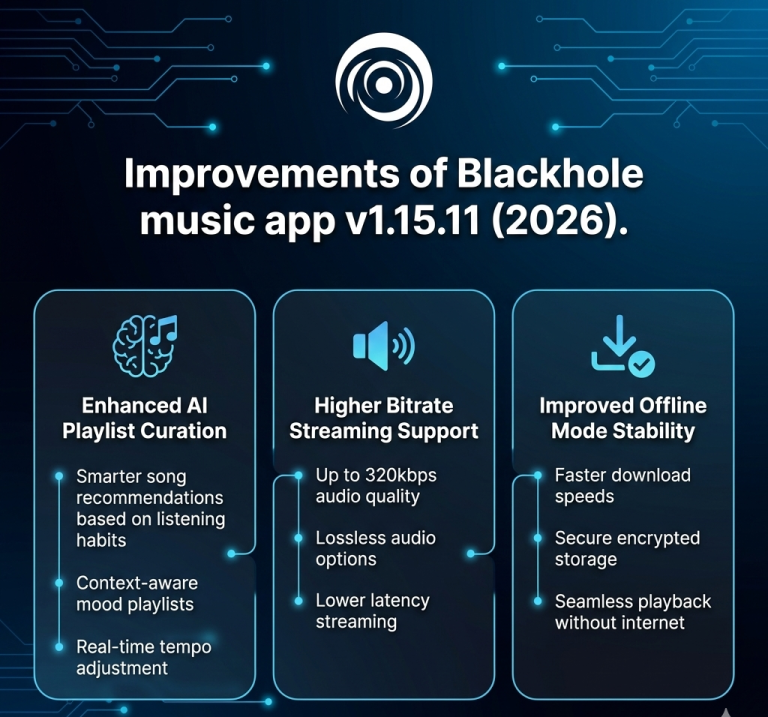
- True 320kbps AAC Extraction: Set the bitrate of streaming/offline downloads to 320kbps AAC in Music & Playback Settings. This is to avoid auto downsampling on switching between WiFi and mobile data connection.
- On-the-Fly ID3 Container Tagging: Downloaded files are stored as .mp3 or .m4a files containing embedded ID3 tags such as release year, album title, high resolution cover art and synced lyrics returned through open APIs such as LRCLIB. This way, your local music library is displayed accurately in any third-party media player.
Smart Automation
For optimal performance when commuting or working late, use BlackHole’s built-in automation and hardware integration features:
- Audio Normalization & Equalization: Use the internal audio equalizer to sculpt the frequency response for particular headphones, as well as to enable volume normalization so that there are no abrupt sound increases when switching input devices.
- Background Caching & Timers: Keep tracks played offline, use automatic background caching and gradually fade out audio while listening after night.
- Data Saver Mode: Automatically scale down streaming bitrates when connected to mobile data while preserving 320kbps for Wi-Fi connections and offline downloads.
- Strict Offline Toggle: Force the application into a pure local-player mode to prevent any background network requests while traveling.
- Custom DNS & Proxy Configuration: Input custom DNS servers or SOCKS5 proxies directly inside the app settings to maintain access on restricted Wi-Fi networks.
Conclusion
BlackHole Music is more than a media player, it’s music that can put you back in control of your media library. Multi-source stream aggregation, 320kbps audio quality, transparent local JSON backups and full ID3 tag editing combine to form an ad-free, user-controlled music hub that’ll last a long time.